
Getting Started with Prescription Files
The Prescription Tool in Solvi allows you to generate precise, variable-rate application maps for different types of field operations.
These maps, also known as prescription files, can be exported in several standard formats and used directly with agricultural machinery or farm management systems.
The tool supports both vegetation index–based and AI-driven data sources, making it useful for a wide range of applications — from variable-rate fertilization to spot spraying and targeted crop management.
Supported Data Sources
Prescription maps can be created using two primary types of input data:
- Vegetation Indices
- Derived from RGB or multispectral imagery.
- Suitable for field-scale fertilizer and nutrient management.
- PlantAI Outputs
- Derived from plant-level detections.
- Enables spot spraying and variable-rate applications for high-value or row crops.
- Supports metrics such as:
- Plant size (diameter or area)
- Plant density
- Canopy Cover
Grid Configuration
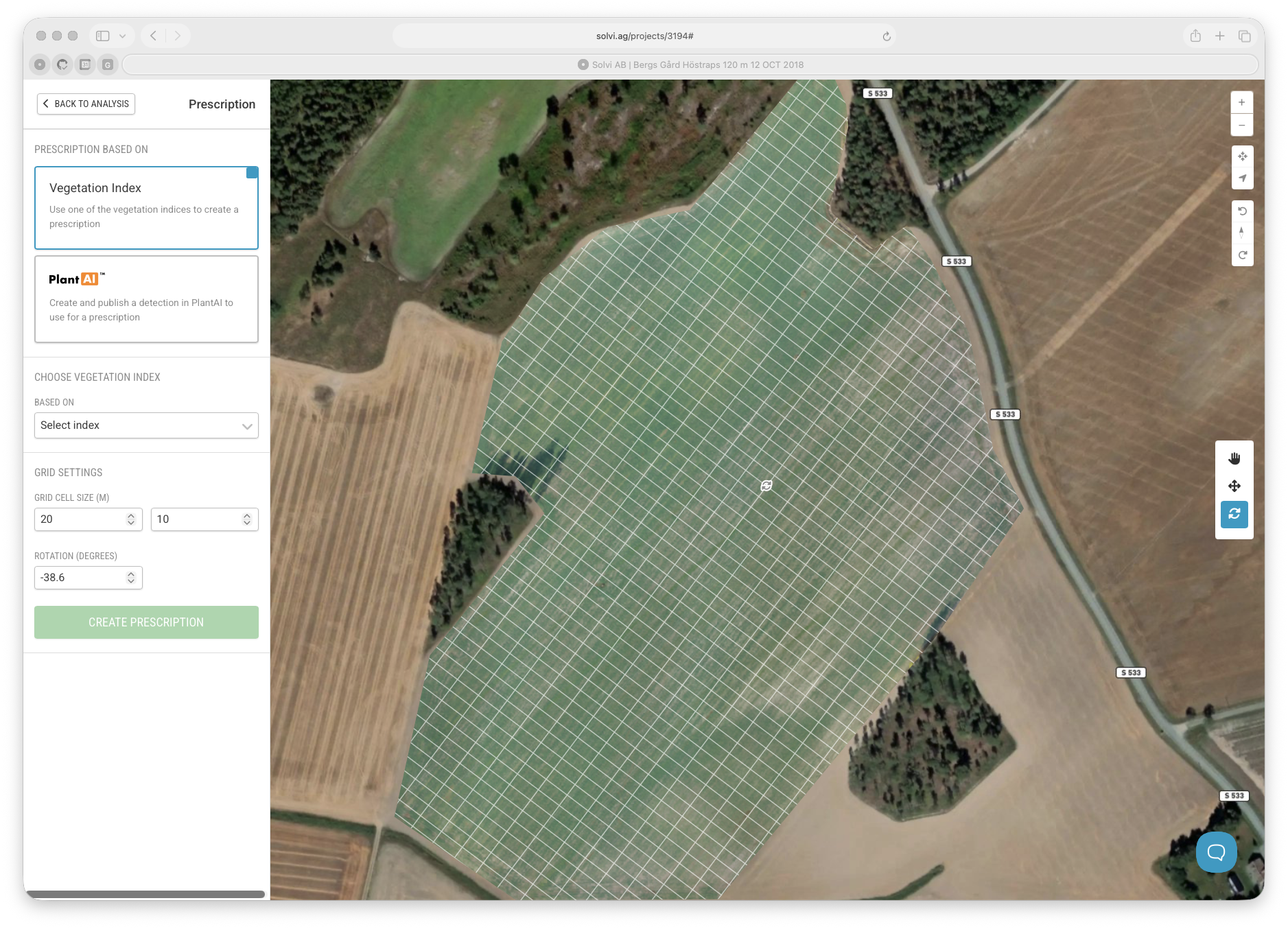
When creating a prescription, the field is divided into a grid that determines how rates are applied across the area.
Grid parameters can be adjusted to match the specifications of your equipment and field layout:
- Rotation — Align the grid with the driving direction of the tractor or sprayer.
- Working width — Match the cell width to the implement’s working width.
- Cell height — Define how frequently the rate changes along the driving path.
-
Alignment — Drag and adjust the grid visually so it follows tramlines.
Data Metrics for Prescription Generation
Depending on the chosen data source, different metrics can be used to generate the prescription map:
| Data Source | Example Metrics | Typical Use Case |
|---|---|---|
| Vegetation Index | NDVI, GLI, NDRE | Variable-rate fertilizer application |
| PlantAI | Plant size (diameter, area) | Fertilizer application in vegetable or specialty crops |
| PlantAI | Plant density | Replanting or population-based rate adjustment |
| PlantAI | Weed detection | Spot spraying and targeted herbicide application |
Workflow Overview
The prescription creation process follows a consistent step-by-step workflow:
- Create a new prescription – Choose the data source (Vegetation Index or PlantAI).
- Configure the grid – Adjust rotation, cell size, and alignment to match machinery and field layout.
- Select input metric – Choose the metric or layer that will define rate zones.
- Generate the prescription map – The system automatically classifies and visualizes the field into rate zones.
- Assign rates – Specify desired application rates (fertilizer, spray, etc.) for each class.
- Export and apply – Download the prescription file in the preferred format for your equipment.
Supported Export Formats
Prescription files can be exported in several standard formats compatible with common agricultural equipment and software platforms:
- Generic Shapefile (.shp)
- John Deere
- DJI Agras drones
- Hardi GeoSelect
Typical Use Cases
| Use Case | Data Source | Application Type |
|---|---|---|
| Fertilizer adjustment in broadacre crops | Vegetation Index (e.g., NDVI, GLI) | Variable-rate fertilizer application |
| Fertilizer optimization in specialty crops | PlantAI (plant size or density) | Variable-rate fertilization for even growth |
| Spot spraying for weed control | PlantAI (weed detection) | Targeted herbicide application |
Key Benefits
- Create highly accurate, machinery-ready variable-rate maps.
- Combine field imagery and AI-based detections in one workflow.
- Reduce input use and improve field uniformity.
- Adapt prescriptions for different crops, growth stages, and machinery setups.