
Understanding the Hierarchy
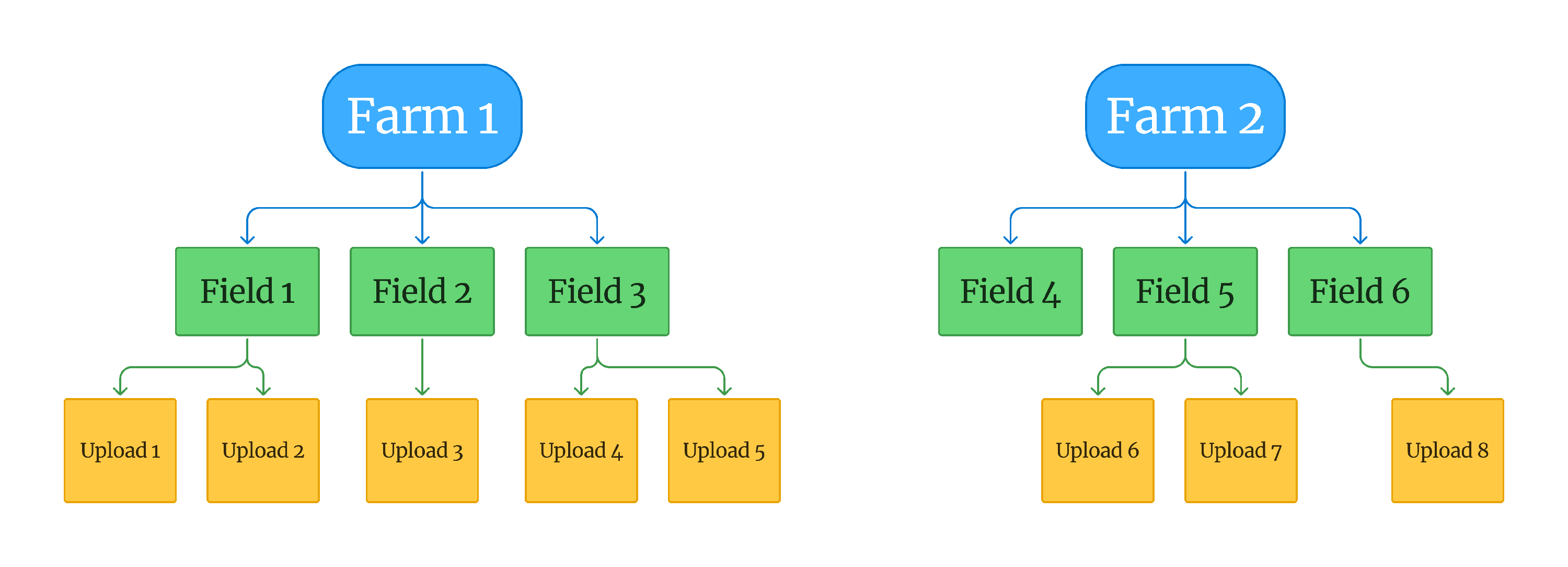
Data in Solvi is organized into three levels: Farms, Fields, and Uploads. This hierarchy keeps your projects structured and makes it easy to navigate between datasets and sharing them with others.
Farms, Fields, and Uploads
At the top level are Farms. Each Farm can contain multiple Fields, and each Field can hold multiple Uploads. An Upload represents one set of drone images collected during a flight. This structure allows you to group flights logically and compare results over time within the same field.
No Geographic Restrictions
Farms and Fields in Solvi are logical containers only. There are no geographic restrictions, meaning Farms can include Fields located anywhere, even in different regions or countries. Fields within a Farm also do not need to be close to each other. This flexibility makes it possible to manage data from multiple sites under a single account.
Account Types and Limits
Every Solvi account starts with one default Farm. Users with Professional or Enterprise plans can create additional Farms. There is no limit on the number of Fields you can create within a Farm, and each Field can contain as many uploads as needed.